Asynchronous and deferred JavaScript execution explained
async and defer are two attributes that a <script> tag can have (and are available in most modern browsers) and are quite useful. Usually you can specify when the JavaScript code should start executing by where you place the tags. Having all the script tags in your <head> will delay your page rendering quite a bit depending on the size of the files and execution time.
Normal <script>
...is the default behavior of the <script> element and whenever the parser encounters a script tag, parsing the HTML code will be paused until the code is loaded and executed. For a page with multiple scripts this may mean a lot
Defered <script defer>
...means the file will load in parallel with the HTML parsing and its execution will be delayed for when the page is fully rendered, thus, the DOM will be available when the scripts starts running
Asynchronous <script async>
...means the file will load whenever, and the script will execute as soon as it's ready. The HTML parsing will pause if the scripts needs to run. Also, you can't rely on the order in which the scripts are executed using async
For a more visual description

JSProfiler – Javascript memory profiler
JsProfiler is a small javascript that I've build to help me identify memory leaks and improve overall performance of some code I was working on.
It works by wrapping all the methods in the given context and keeping track of the number of times they run, how much memory they consume and how long they take to execute.
The results can be viewed real time in a small overlay or you can track specific methods and see the output in the console.
Unfortunately it only works in Google Chrome since Chrome exposes the memory information.
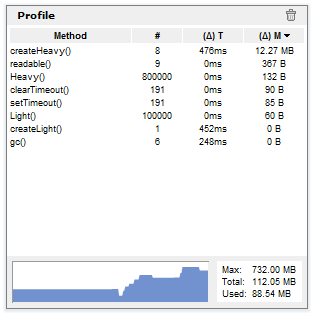
More usage information and download on github
Make a JavaScript getter act both as getter and as a function
So I have a object that exposes a getter to retrieve data after some expensive synchronous computation.
    function processData() {
       // lots of stuff happening here
       return result;
    }

   return {
      get data () {
          // some checks happening here
           return procesData();
      }
} |
var obj = new MyObject(); var x = obj.data; // this stops things for 2 or 3 seconds // .. carry on |
Since this is part of an already used library, is getting pretty hard to change the public interface for backwards compatibility reasons.
The thing is I've added a asynchronous processData method and i want to make that available as well without changing the public methods. The normal thing to do would be to convert the getter into a method called getData() and getDataAsync(callback) but that wouldn't work because it will annoy some people when they see their code isn't working anymore.
The solution couldn't be easier but it took me a while to figure it out and as always, it's sharing time.
    function processData() {
       // lots of stuff happening here
       return result;
    }

    function processDataAsync(callback) {
      if (!arguments.length || arguments.length && typeof arguments[0] !== "function") {
            return processData();
      }
      // lots of stuff happening here but asynchronously
      callback(result);
    }

    processDataAsync.__proto__ = {valueOf : processData};

   return {
      get data () {
           // some checks happening here
           return processDataAsync;
      }
} |
var obj = new MyObject(); var x = obj.data; // get data synchronously // .. carry on after 2 seconds var obj = new MyObject(); var x = obj.data(); // still a synchronous call since no callback was given // .. carry on after 2 seconds var obj = new MyObject(); obj.data(function(result) { // get the data here after few seconds without blocking anything } // .. carry on right away |
So now the same getter can be used from now on as a asynchronous function if used with parentheses and given a callback or as a simple getter.
Read data directly from base64 without decoding
So here's the catch. You have a binary input you want to mess with in your browser for whatever reason. First problem you encounter is when you load the file. In IE you will have trouble reading a binary string because it uses null terminated strings, and your file will end at the first 0x00 byte found. If you manage to overcome that but trust me it is very CPU intensive. See the source of Read/Load files from ZIP in Javascript post. You will have to create a vbScript that will convert the received AJAX response into an array with decimal values for each byte in the file. Depending on your file size, it will take accordingly (10+ seconds * file KB). For every other browser it works just fine with plain strings.
Okay, one other potential issue may come if you need to receive the data into a JSON string or XML or whatever beside a plain binary file. Then you have to use BASE64 encoding and decode your data into a variable but must keep in mind the first issue with the null characters. My solution to this problem is to create a method to read directly from the BASE64 encoded string at arbitrary locations without decoding the entire thing.
Here's an example of a binary file:
Offset(h)00 01 02 03 04 05 06 07 08 09 0A 0B 0C 0D 0E 0F 00000000 00 01 02 03 04 05 06 07 08 09 0A 0B 0C 0D 0E 0F ............... 00000010 19 84 74 68 69 73 20 69 73 20 61 20 74 65 73 74 ..this is a test |
You have 32 bytes in this file, with BASE64 encoding you get a 46 chars length string:
AAECAwQFBgcICQoLDA0ODxmEdGhpcyBpcyBhIHRlc3Q= |
A usage example:
var data = new Base64Native("AAECAwQFBgcICQoLDA0ODxmEdGhpcyBpcyBhIHRlc3Q="); console.log(data.length); // outputs 32; console.log(data.readBoolean()); // outputs false; - reads a byte and casts it to a boolean value console.log(data.readByte()); // outputs 1; console.log(data.readWord()); // outputs 515; - reads a 16 bit number console.log(data.readInt()); // outputs 67438087; - reads a 32 bit number console.log(data.seek(28)); // moves the pointer to byte 28 (0x1C) console.log(data.readString(data.bytesAvailable())); // outputs 'test'; reads a string from position 28 to the end of the file |
And here's the class
var Base64Native = function(data) { var keyStr = "ABCDEFGHIJKLMNOPQRSTUVWXYZabcdefghijklmnopqrstuvwxyz0123456789+/=", length = data.length - (data.length / 4) - (data.split(/=/g).length - 1), ptr = 0; function keyIdx(idx) { return keyStr.indexOf(data.charAt(idx)); } function readByte() { if (!(length - ptr)) { throw Error('End of stream!'); } var blockIndex = Math.floor(ptr / 3) * 4, subIndex = ptr++ % 3, ptrChr = blockIndex + subIndex; return !subIndex && ((keyIdx(ptrChr) < < 2) | (keyIdx(ptrChr + 1) >> 4)) || subIndex === 1 && (((keyIdx(ptrChr) & 15) < < 4) | (keyIdx(ptrChr + 1) >> 2)) || ((keyIdx(ptrChr) & 3) < < 6) | keyIdx(ptrChr + 1); } return { /* Returns the available bytes left in the file to read */ bytesAvailable : function() { return length - ptr; }, /* Reads and returns a 8 bit number and increments the position of the index accordingly */ readByte : function() { return readByte(); }, /* Reads and returns a 32 bit number and increments the position of the index accordingly */ readInt : function() { return (readByte() << 24) | (readByte() << 16) | (readByte() << 8) | readByte(); }, /* Reads 1 byte and returns the boolean value of it and increments the position of the index accordingly */ readBoolean : function() { return Boolean(readByte()); }, /* Reads and returns a 16 bit number and increments the position of the index accordingly */ readWord : function() { return readByte() << 8 | readByte() }, /* Reads and returns a string of length 'len' and increments the position of the index accordingly */ readString : function(/*String*/len) { var data = ''; for (var i = 0; i < len; i++) { data += String.fromCharCode(readByte()); } return data; }, /* Moves the index into the file at location newpos */ seek : function(newpos) { ptr = newpos; }, /* Returns the position of the index in the file */ position : function() { return ptr; }, /* The length of the data */ length : length }; }; |
jQuery.quickEach
With jQuery, when you need to iterate all elements with a specific class for example, you use the each() method and inside the callback function you must convert the DOM element you receive as this to a jQuery object in order to access it's jQuery specific methods: $(this)
This is not such a big issue but if you have a lot of items and/or do this often, then times ads up. It would be a blast to have the this object directly as a jQuery instance. So here's a $ little plugin that does exactly that
Source website:
http://jsperf.com/jquery-each-vs-quickeach
The code:
1 2 3 4 5 6 7 8 9 10 11 12 13 14 15 | jQuery.fn.quickEach = (function() { var jq = jQuery([1]); return function(c) { var i = -1, el, len = this.length; try { while (++i < len && (el = jq[0] = this[i]) && c.call(jq, i, el) !== false); } catch (e) { delete jq[0]; throw e; } delete jq[0]; return this; }; }()); |
If you run the test on that page, on most browsers you'll see that quickEach() is about 80% faster than native each()