JSProfiler – Javascript memory profiler
JsProfiler is a small javascript that I've build to help me identify memory leaks and improve overall performance of some code I was working on.
It works by wrapping all the methods in the given context and keeping track of the number of times they run, how much memory they consume and how long they take to execute.
The results can be viewed real time in a small overlay or you can track specific methods and see the output in the console.
Unfortunately it only works in Google Chrome since Chrome exposes the memory information.
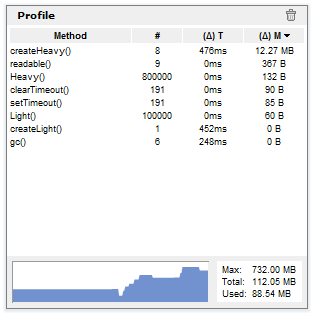
More usage information and download on github
Make a JavaScript getter act both as getter and as a function
So I have a object that exposes a getter to retrieve data after some expensive synchronous computation.
    function processData() {
       // lots of stuff happening here
       return result;
    }

   return {
      get data () {
          // some checks happening here
           return procesData();
      }
} |
var obj = new MyObject(); var x = obj.data; // this stops things for 2 or 3 seconds // .. carry on |
Since this is part of an already used library, is getting pretty hard to change the public interface for backwards compatibility reasons.
The thing is I've added a asynchronous processData method and i want to make that available as well without changing the public methods. The normal thing to do would be to convert the getter into a method called getData() and getDataAsync(callback) but that wouldn't work because it will annoy some people when they see their code isn't working anymore.
The solution couldn't be easier but it took me a while to figure it out and as always, it's sharing time.
    function processData() {
       // lots of stuff happening here
       return result;
    }

    function processDataAsync(callback) {
      if (!arguments.length || arguments.length && typeof arguments[0] !== "function") {
            return processData();
      }
      // lots of stuff happening here but asynchronously
      callback(result);
    }

    processDataAsync.__proto__ = {valueOf : processData};

   return {
      get data () {
           // some checks happening here
           return processDataAsync;
      }
} |
var obj = new MyObject(); var x = obj.data; // get data synchronously // .. carry on after 2 seconds var obj = new MyObject(); var x = obj.data(); // still a synchronous call since no callback was given // .. carry on after 2 seconds var obj = new MyObject(); obj.data(function(result) { // get the data here after few seconds without blocking anything } // .. carry on right away |
So now the same getter can be used from now on as a asynchronous function if used with parentheses and given a callback or as a simple getter.
Pixel Programming
If you're old enough you may have seen the times when programmers wrote code as optimal as possible given the computers available back then. I remember 3D shooter games that would average 300 - 400 KB in size and you would play countless levels for days. Here's for example a 96 KB 3D shooter game called .kkriger that will leave you breathless.

If you try now to explain people these days that it takes less space to write a 3 minutes HD animated video and music clip than than it takes to store a 32×32 pixel icon they won't believe you. Not now when a plain jpeg image used on some website is > 50KB. So here's a guy called Iñigo Quílez who demonstrates just that using the image analogy. He writes a x86 real mode demo using Photoshop. The entire program is done by creating a 9x9 pixels image, filling each pixels with carefully chosen colors to represent the correct opcodes (who needs compilers, right ?) The image is then saved in a .raw format (no headers) then renames it to a .com file so that Windows recognize it as a executable. The animation is a infinite moving tunnel with a gray colored texture created with an XOR pattern, blurred, and deformed using a plane deformation technique to produce the animation.
This is the "source code" resized 10 times in a png extension

And here's the guy in action proving his mad skills.
Read data directly from base64 without decoding
So here's the catch. You have a binary input you want to mess with in your browser for whatever reason. First problem you encounter is when you load the file. In IE you will have trouble reading a binary string because it uses null terminated strings, and your file will end at the first 0x00 byte found. If you manage to overcome that but trust me it is very CPU intensive. See the source of Read/Load files from ZIP in Javascript post. You will have to create a vbScript that will convert the received AJAX response into an array with decimal values for each byte in the file. Depending on your file size, it will take accordingly (10+ seconds * file KB). For every other browser it works just fine with plain strings.
Okay, one other potential issue may come if you need to receive the data into a JSON string or XML or whatever beside a plain binary file. Then you have to use BASE64 encoding and decode your data into a variable but must keep in mind the first issue with the null characters. My solution to this problem is to create a method to read directly from the BASE64 encoded string at arbitrary locations without decoding the entire thing.
Here's an example of a binary file:
Offset(h)00 01 02 03 04 05 06 07 08 09 0A 0B 0C 0D 0E 0F 00000000 00 01 02 03 04 05 06 07 08 09 0A 0B 0C 0D 0E 0F ............... 00000010 19 84 74 68 69 73 20 69 73 20 61 20 74 65 73 74 ..this is a test |
You have 32 bytes in this file, with BASE64 encoding you get a 46 chars length string:
AAECAwQFBgcICQoLDA0ODxmEdGhpcyBpcyBhIHRlc3Q= |
A usage example:
var data = new Base64Native("AAECAwQFBgcICQoLDA0ODxmEdGhpcyBpcyBhIHRlc3Q="); console.log(data.length); // outputs 32; console.log(data.readBoolean()); // outputs false; - reads a byte and casts it to a boolean value console.log(data.readByte()); // outputs 1; console.log(data.readWord()); // outputs 515; - reads a 16 bit number console.log(data.readInt()); // outputs 67438087; - reads a 32 bit number console.log(data.seek(28)); // moves the pointer to byte 28 (0x1C) console.log(data.readString(data.bytesAvailable())); // outputs 'test'; reads a string from position 28 to the end of the file |
And here's the class
var Base64Native = function(data) { var keyStr = "ABCDEFGHIJKLMNOPQRSTUVWXYZabcdefghijklmnopqrstuvwxyz0123456789+/=", length = data.length - (data.length / 4) - (data.split(/=/g).length - 1), ptr = 0; function keyIdx(idx) { return keyStr.indexOf(data.charAt(idx)); } function readByte() { if (!(length - ptr)) { throw Error('End of stream!'); } var blockIndex = Math.floor(ptr / 3) * 4, subIndex = ptr++ % 3, ptrChr = blockIndex + subIndex; return !subIndex && ((keyIdx(ptrChr) < < 2) | (keyIdx(ptrChr + 1) >> 4)) || subIndex === 1 && (((keyIdx(ptrChr) & 15) < < 4) | (keyIdx(ptrChr + 1) >> 2)) || ((keyIdx(ptrChr) & 3) < < 6) | keyIdx(ptrChr + 1); } return { /* Returns the available bytes left in the file to read */ bytesAvailable : function() { return length - ptr; }, /* Reads and returns a 8 bit number and increments the position of the index accordingly */ readByte : function() { return readByte(); }, /* Reads and returns a 32 bit number and increments the position of the index accordingly */ readInt : function() { return (readByte() << 24) | (readByte() << 16) | (readByte() << 8) | readByte(); }, /* Reads 1 byte and returns the boolean value of it and increments the position of the index accordingly */ readBoolean : function() { return Boolean(readByte()); }, /* Reads and returns a 16 bit number and increments the position of the index accordingly */ readWord : function() { return readByte() << 8 | readByte() }, /* Reads and returns a string of length 'len' and increments the position of the index accordingly */ readString : function(/*String*/len) { var data = ''; for (var i = 0; i < len; i++) { data += String.fromCharCode(readByte()); } return data; }, /* Moves the index into the file at location newpos */ seek : function(newpos) { ptr = newpos; }, /* Returns the position of the index in the file */ position : function() { return ptr; }, /* The length of the data */ length : length }; }; |